
Learn how to set up Meta ads that bring in real, high-quality leads. A simple step-by-step guide to targeting, creatives, lead forms and tracking.
Most businesses that try Meta ads run into the same problem. The leads come in, the cost per lead looks great, and then nobody picks up the phone. Sound familiar?
Getting more leads is easy. Getting the right leads is where the real work is. The good news is that you don’t need a huge budget or a fancy agency to fix it. You just need a clear setup and a few smart habits.
In this guide, we’ll walk through how to set up meta ads (Facebook and Instagram) so they bring in people who are actually interested in buying from you.
1. Start With a Clear Goal
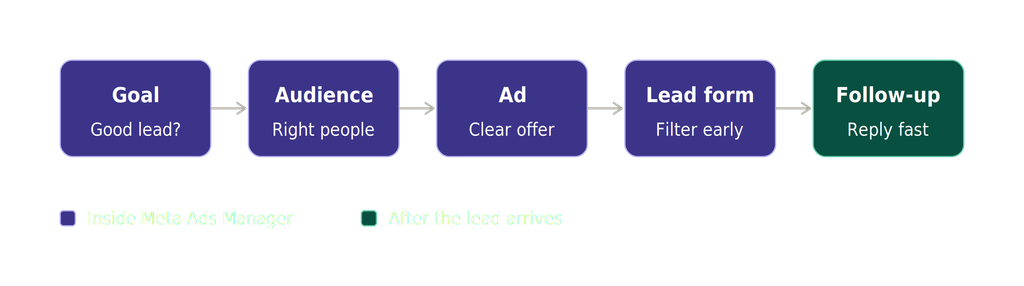
Before you open Meta Ads Manager, answer one question: what is a good lead for my business? And how to set up meta ads?
A good lead is not just someone who fills a form. It could be someone who books a call, has a budget that fits your price, or lives in the area you serve. Write this down. Every choice you make later, from the audience to the ad copy, should match this definition.
If you sell web development services, for example, a good lead might be a business owner who needs a website in the next 3 months and has a budget of at least $1,000. That is very different from a student looking for free tips.
2. Know Who You Are Talking To And How To Set up Meta Ads
The best way to start how to set up Meta ads is by knowing exactly who you want to reach. Meta ads work best when they speak to one type of person. Take ten minutes and describe your ideal customer:
- What problem are they trying to solve?
- What do they worry about before buying?
- What words do they use when they talk about this problem?
Use these answers in your ad. If your ad sounds like it was written for everyone, it will attract no one in particular.
3. Pick the Right Campaign Objective
When you learn how to set up Meta ads, the first step inside Ads Manager is choosing a campaign objective. For lead generation, choose Leads (also called the Leads objective).
Then decide where the lead is collected:
- Instant forms: The person fills out a form inside Facebook or Instagram. It’s quick and easy for them.
- Your website: The person clicks your ad and fills a form on your landing page.
- Messages or calls: The person starts a chat or calls you directly.
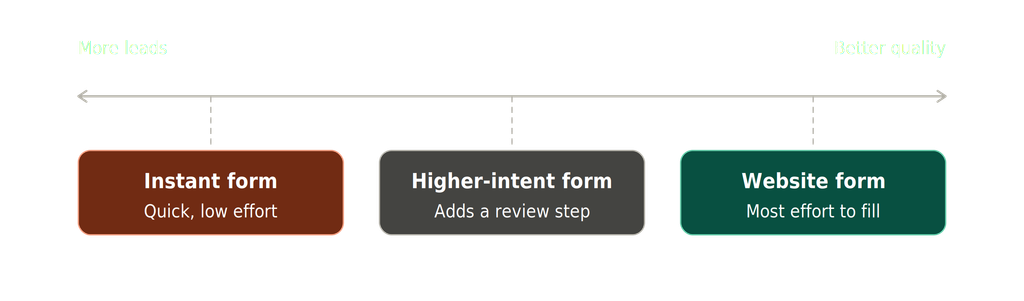
Instant forms give you more leads, but often lower quality, because it takes almost no effort. A website form takes more effort, so the people who finish it are usually more serious. If quality matters more than volume, lean toward your website or add extra steps to your instant form (more on that below).
4. Set Up Your Audience Carefully
This is where many people either go too broad or too narrow.
Start with the basics: location, age range and language. Be honest about where your customers really are. If you only serve Delhi and nearby cities, don’t target the whole country.
Use Advantage+ audience as a helper, not a boss. Meta’s system is quite good at finding people once it has data. You can give it suggestions (like interests or job roles) and let it explore from there.
Try a lookalike audience. If you already have a list of past customers, upload it to Meta and create a lookalike audience. Meta will find people who are similar to your best buyers. This is one of the easiest ways to improve lead quality.
Exclude the wrong people. Remove existing customers, your own team and people who already filled out your form.
5. Choose Placements and Budget Wisely
For beginners, automatic placements are fine. Meta will show your ads across Facebook, Instagram, Messenger and more, wherever they perform best.
For budget, start small but give the ads enough time to learn. A common rule is to spend at least enough to get 50 leads or conversions in a week. If that’s too much, aim for a daily budget you can keep up for at least 7 to 14 days. Changing things every day confuses the system and wastes money.
6. Create Ads That Filter, Not Just Attract
Here’s a secret most people miss: a good ad should scare away the wrong people.
Be specific about who the offer is for, what it costs (or at least a starting price) and what happens next. For example:
“Running a small business and need a website that brings in customers? Our packages start at $999. Fill the form and we’ll call you within 24 hours.”
That one line already tells people the price range, the audience and the next step. People who can’t afford it will scroll past, which is exactly what you want.
Tips for better creatives:
- Use real photos or short videos instead of stock images.
- Show the result your customer wants, not just your product.
- Keep the first line of your copy short and clear.
- Use one call to action, such as “Book a free call”.
- Try 3 to 5 different ads so Meta can show you what works.
7. Make Your Lead Form Work for You
If you use Meta’s instant forms, don’t leave them on the default settings. Make these changes:
- Choose “Higher intent” form type. This adds a review screen before submitting, so people stop and think. You’ll get fewer leads, but better ones.
- Ask one or two qualifying questions. For example: “What’s your budget?” or “When do you want to start?”
- Use multiple-choice answers. They’re easy to answer and easy for you to sort later.
- Add a short, honest intro. Tell people what will happen after they submit.
If you send people to a landing page, keep it simple. One headline, a few benefits, social proof like reviews, and one form. Make sure it loads fast on mobile, because most Meta traffic comes from phones.
8. How to Set Up Meta Ads and Tracking Properly
You can’t improve what you can’t measure. Install the Meta Pixel on your website and set up the Conversions API if you can. This helps Meta see which clicks turn into real actions, so it can find more people like them.
If you want the best results, don’t stop at “form submitted” as your goal. Track the next step too, like a booked call or a qualified lead. Then feed that information back to Meta. The system learns from what you tell it, so tell it what really matters.
9. Follow Up Fast
This one has nothing to do with Meta, but it matters a lot. Leads go cold quickly. Try to reach out within the first hour, ideally within minutes.
Send a short, friendly message or call them. Even a simple “Hi, thanks for your interest, when is a good time to talk?” can double your chances of a response. If you’re slow, even the best lead will lose interest or go to a competitor.
10. Test, Measure and Improve
Check your results every few days, but don’t panic over one bad day. Look at these numbers, and find the solution for how to set up meta ads.
- Cost per lead: How much each lead costs you.
- Cost per qualified lead: How much each good lead costs. This is the number that really counts.
- Lead-to-customer rate: How many leads actually become paying clients.
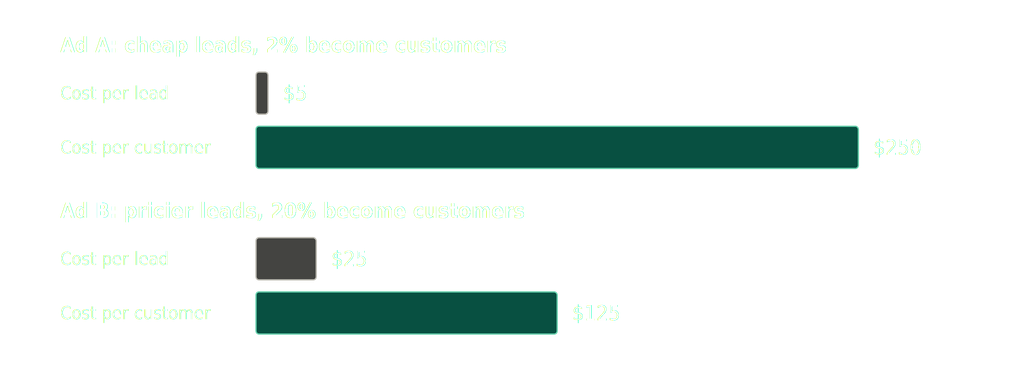
A $5 lead that never buys is more expensive than a $25 lead that does. Turn off ads that bring cheap but useless leads, and put more money behind the ones that bring buyers.
Change one thing at a time, such as the headline, the image or the audience. That way you know what made the difference.
Common Mistakes to Avoid
- Targeting too broadly without any filters
- Using only one ad and hoping for the best
- Ignoring leads after they come in
- Judging success by cost per lead alone
- Changing settings too often during the learning phase
- Sending traffic to a slow or confusing landing page
Final Thoughts
Great Meta ads aren’t about tricks or hacks. They come down to knowing your ideal customer, writing honest and clear ads, setting up smart forms, tracking the right things and following up quickly.
Start small, learn from your data and keep improving. Over time, you’ll spend less on ads and get more customers who are happy to pay.
Need help setting up or fixing your Meta ads? The team at Skyfish can help you build a lead generation system that brings in people who are ready to buy. Get in touch with us and let’s grow your business together.